> ## Documentation Index
> Fetch the complete documentation index at: https://support.entegrata.com/llms.txt
> Use this file to discover all available pages before exploring further.
# Network Connections
> Configure and manage network connections between your infrastructure and Entegrata
## Overview
Network connections enable secure communication between your on-premises or Azure-based systems and your Entegrata instance. These connections allow Entegrata collectors to access your systems while maintaining network isolation and security.
Entegrata supports three connection types:
* **Site-to-Site (S2S) VPN** - Encrypted tunnel between your network and Entegrata
* **VNet Peering** - Direct Azure Virtual Network connection for Azure-based infrastructure
* **ExpressRoute** - Private, high-bandwidth connection via an Azure ExpressRoute circuit
Network connections are configured during instance provisioning and can also be managed after go-live through the **Network Connections** page in Instance Settings.
## Connection Status
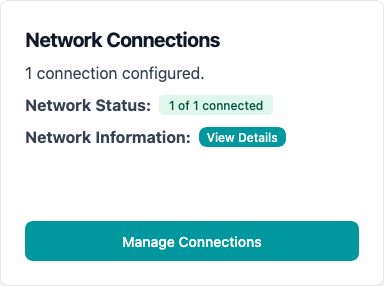
The Network Connections card displays the current status of your connection with color-coded badges for quick identification.
 ### Network Status Meanings
🟢 Connected - Network connection is active and functioning
🟡 Transitioning - Connection is being established or modified
🔴 Error - Connection failed or encountered an issue
⚫ Not Connected - No active connection configured
If your connection status shows **Error** or **Not Connected** and you expect it to be active, contact Entegrata support immediately. Collectors will not be able to access your systems while the connection is unavailable.
## Network Configuration
### What Network Configuration Controls
Network configuration defines which IP addresses and CIDR ranges are allowed to communicate with your Entegrata instance. This ensures that only authorized systems can establish network connections.
### Viewing Network Configuration
To view your current configuration select \*\*Network Information: View Details \*\*on the Network Configuration card.
The modal displays:
* **Internal/API Whitelisting**: IPs Entegrata uses to call external APIs
* **Firm Systems Access**: CIDR ranges allowed to access firm systems To view your current network configuration:
## IP Whitelisting
### Why IP Whitelisting Matters
IP whitelisting ensures that only known and trusted systems can communicate with your Entegrata instance. This prevents unauthorized access attempts and provides an additional security layer beyond authentication.
Entegrata collectors running in your environment must have their IP addresses whitelisted to successfully transmit data to your instance. Missing IPs will result in collection failures.
Many regulatory frameworks require strict network access controls. IP whitelisting helps satisfy these requirements by providing traceable, auditable network access restrictions.
## CIDR Ranges for System Access
### Understanding CIDR Notation
CIDR (Classless Inter-Domain Routing) notation allows you to specify ranges of IP addresses efficiently:
| CIDR Range | Description | Number of IPs |
| ------------ | ----------------- | ------------- |
| `x.x.x.x/32` | Single IP address | 1 |
| `x.x.x.x/24` | Class C subnet | 256 |
| `x.x.x.x/16` | Class B subnet | 65,536 |
| `x.x.x.x/8` | Class A subnet | 16,777,216 |
## Managing Network Connections
### How Connections Are Established
Network connections are typically configured during instance provisioning:
Entegrata's team assesses your network architecture to determine the optimal connection type (S2S VPN, VNet Peering, or ExpressRoute).
Based on your infrastructure, the appropriate connection parameters are configured, including:
* Gateway IPs (for S2S VPN)
* Encryption settings (for S2S VPN)
* Peering settings (for VNet Peering)
* Circuit Resource ID and Authorization Key (for ExpressRoute)
The connection is provisioned through Azure infrastructure, creating the secure network path between your systems and Entegrata.
Status changes to **Connected** once the connection is successfully established and verified.
## Connection Types
### Site-to-Site (S2S) VPN
An encrypted IPsec tunnel between your on-premises VPN device and Entegrata's Azure VPN Gateway. Best for on-premises or hybrid environments with existing VPN infrastructure.
### VNet Peering
A direct Azure Virtual Network peering connection. Best for organizations with Azure-hosted data sources that want the lowest latency and simplest configuration.
### ExpressRoute
A private, high-bandwidth connection using an Azure ExpressRoute circuit. Best for organizations that require dedicated connectivity with guaranteed bandwidth and lower latency than internet-based connections.
ExpressRoute connections require:
* **Circuit Resource ID** - The full ARM resource ID of your ExpressRoute circuit
* **Authorization Key** - A single-use key from the circuit owner (required for new connections only)
* **Address Prefixes** (optional) - IP ranges advertised over the circuit, used for CIDR overlap validation
ExpressRoute uses BGP for dynamic routing. Address prefixes are informational and used for validation — the actual routing is handled by the circuit's BGP configuration.
## Troubleshooting Connection Issues
If the status remains in **Transitioning** for more than 30 minutes:
1. Refresh your browser to ensure you're seeing the latest status
2. Check if other infrastructure changes are in progress
3. Contact Entegrata support if the issue persists
If the connection displays **Error**:
1. Check the Network Connections card for error details
2. Verify your VPN gateway is running (for S2S VPN connections)
3. Confirm firewall rules aren't blocking the connection
4. Contact Entegrata support with error details
If collectors fail to connect even with **Connected** status:
1. Verify collector IPs are in the network whitelist
2. Check collector logs for specific connection errors
3. Confirm collectors are using the correct endpoint URLs
4. Review your local firewall rules for outbound blocks
## Next Steps
Configure firewall rules for additional security controls
Manage Entegrata system versions and upgrades
Configure customer-managed keys for data encryption
Get help with network connection issues