> ## Documentation Index
> Fetch the complete documentation index at: https://support.entegrata.com/llms.txt
> Use this file to discover all available pages before exploring further.
# Access Control Overview
> Comprehensive guide to managing data access permissions in Entegrata
## Overview
Entegrata's access control system works hand-in-hand with our data mapping platform to secure your data. Access control data can be ingested from supported data sources into our standardized models, or you can manage new controls directly in our platform. This centralized management and observability gives you a single pane of glass view into data security across your entire data footprint, making it easy to audit permissions, troubleshoot access issues, and ensure the right people see the right data in the edges supported by Entegrata (i.e Power BI, Operational Data Store, AI projects, and more).
Access control rules extend to any endpoint of the lakehouse via tables that contain the rules & who the rules apply to (by individual person). Access Control rules are deliberately stored & shipped in tables so they can be provided to any downstream system - Power BI, AI, a SQL server, etc - and are not beholden to those systems being capable of integrating with Unity Catalog.
## Key Features
Set entity-level default access permissions that apply to all resources of a specific data type
Create granular access rules with subject and object targeting for precise permission control
Organize users into groups with static or dynamic membership for efficient access management
Test and explore permissions to verify access configurations before deployment
## Availability and Prerequisites
Access control features require specific prerequisites to be met before this feature can be utilized. This section outlines those pre-requisites.
### Top-Level Requirement
**Production Pipeline Required:** Access control only works when the "main" production pipeline exists. Below, find additional prerequisites per feature area.
### Supported Entities
Access control rules (both System and Ingested) are available for the following canonical data mappings:
Client entity data mappings
Matter entity data mappings
Person entity data mappings
### Prerequisites by Feature
**Prerequisites for managing access control groups and actors:**
To access the Groups and Actors pages:
* The **Person** entity must be mapped and deployed
To properly identify actors in your entity OBTs (One Big Tables), the **Employment** entity must be deployed with the **Entra** data source as a source that maps Entra's **userPrincipalName** field to the canonical **username** field.
**Prerequisites for managing access control rules on entities:**
To create and manage access control rules:
1. The **Person** entity must be mapped, deployed, and have completed at least one pipeline run (required for subject data)
2. The target entity (Client, Matter, or Person) must be mapped and deployed
3. The main pipeline must have completed at least one run after the target entity was deployed
**Rules cannot be created without subject data.** The Person entity must be mapped, deployed, and have completed at least one pipeline run before any rules can be created. This is required because all rules need subjects (actors or groups) which are derived from Person data.
Rules become available for a target entity once it has been deployed and processed through the main pipeline.
**Prerequisites for enabling access control data ingestion from data sources:**
**Actor Resolution Requirement:** For any actor resolution to take place on ingested rules and groups, each data source must be mapped in the **Person** entity in addition to mapping in Client and/or Matter entities. Without a Person entity mapping for the data source, the system cannot resolve which actors the ingested permissions apply to.
**Required entity mappings:**
* Person entity must be mapped and deployed
* Employment entity must be mapped and deployed
**Mapping Expectations:**
* Map Person entity from the Entra users table
* Map Employment entity from the Entra users table
**Important:** Entra should map **userPrincipalName** to Employment **username** for OBT (One Big Table) usage. Otherwise, the principal name's in the OBTs will fall back to the **email** field on the Person entity.
**Required entity mappings:**
* Person entity must be mapped and deployed
* Client entity must be mapped and deployed
* Matter entity must be mapped and deployed
**Additional requirement:** The CMS\_SECURE\_ROW table with the REVOKED flag and its parent CMS\_SECURE\_PLAN table must contain valid access control data.
**Mapping Expectations:**
* Map Person entity from the Aderant HBM\_PERSNL table
* Map Client entity from the Aderant client table (typically HBM\_CLIENT)
* Map Matter entity from the Aderant matter table (typically HBM\_MATTER)
**Required entity mappings:**
* Person entity must be mapped and deployed
* Client entity must be mapped and deployed
* Matter entity must be mapped and deployed
**Additional requirement:** The Generic Extension must be enabled in your Intapp Walls application.
**Mapping Expectations:**
For each entity, configure the Intapp Walls data source with proper key matching to your primary source (typically Aderant):
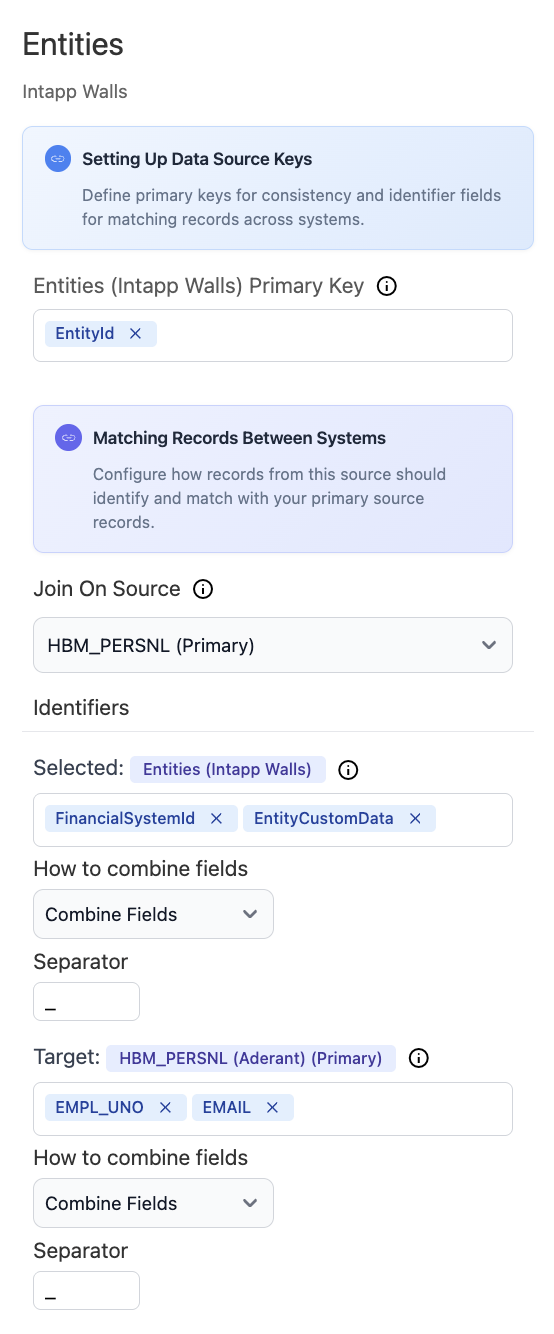
**Person Entity Mapping:**
* Set **EntityId** as the Intapp Walls primary key
* Join on your primary Person source (e.g., HBM\_PERSNL)
* Match Intapp Walls identifiers (**FinancialSystemId**, **EntityCustomData**) to your primary source fields (**EMPL\_UNO**, **EMAIL**)
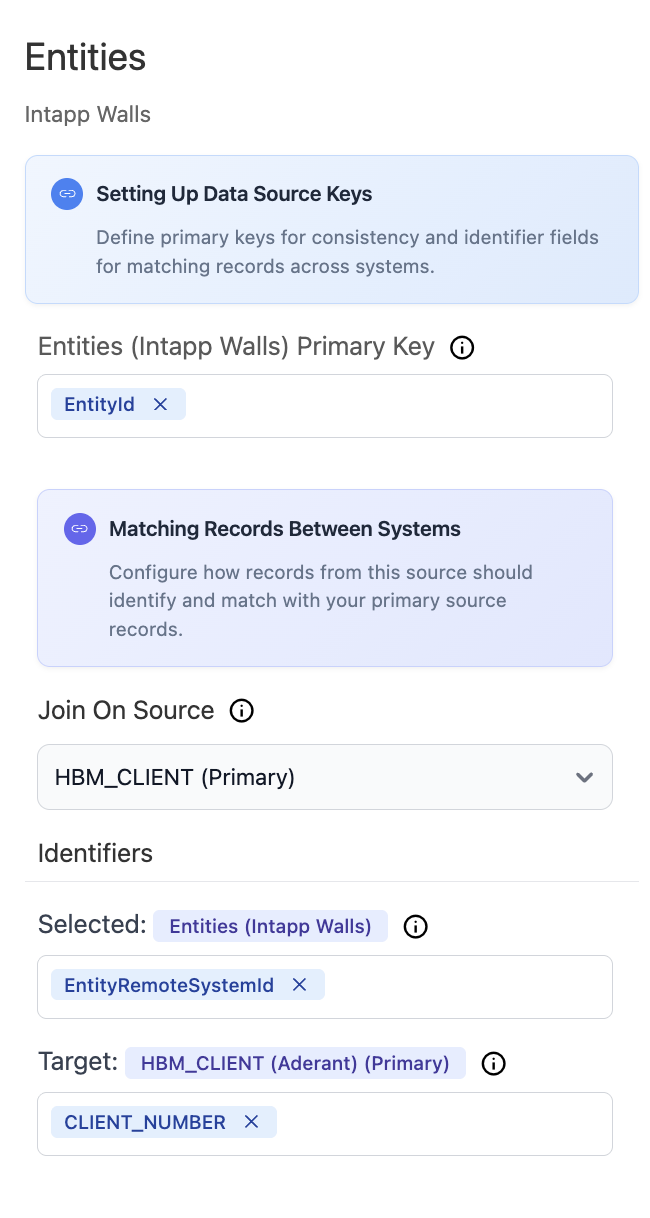
 **Client Entity Mapping:**
* Set **EntityId** as the Intapp Walls primary key
* Join on your primary Client source (e.g., HBM\_CLIENT)
* Match Intapp Walls **EntityRemoteSystemId** to your primary source client identifier (**CLIENT\_NUMBER**)
**Client Entity Mapping:**
* Set **EntityId** as the Intapp Walls primary key
* Join on your primary Client source (e.g., HBM\_CLIENT)
* Match Intapp Walls **EntityRemoteSystemId** to your primary source client identifier (**CLIENT\_NUMBER**)
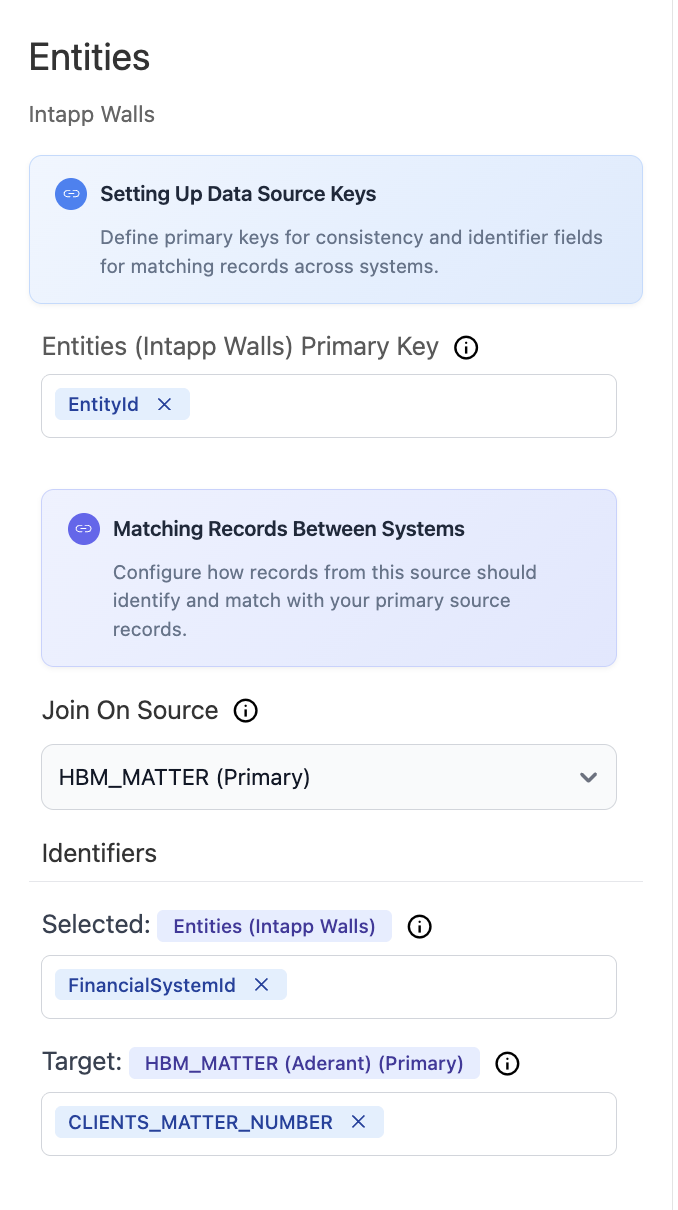
 **Matter Entity Mapping:**
* Set **EntityId** as the Intapp Walls primary key
* Join on your primary Matter source (e.g., HBM\_MATTER)
* Match Intapp Walls **FinancialSystemId** to your primary source matter identifier (**CLIENTS\_MATTER\_NUMBER**)
**Matter Entity Mapping:**
* Set **EntityId** as the Intapp Walls primary key
* Join on your primary Matter source (e.g., HBM\_MATTER)
* Match Intapp Walls **FinancialSystemId** to your primary source matter identifier (**CLIENTS\_MATTER\_NUMBER**)
 ### Rule Types
**Available for: Client, Matter, and Person entities**
Once prerequisites are met for an entity:
* Create custom access rules directly in Entegrata
* Build groups with static or dynamic membership
* Define granular permissions for your data
* Layer controls on top of any existing permissions
System rules provide full control and can be edited or deleted at any time.
**Available for: Entra, Aderant, and Intapp Walls data sources**
For supported data sources with prerequisites met, you can additionally:
* Import existing access control configurations
* Synchronize security groups from source systems
* Maintain visibility of source-defined permissions
* Combine ingested rules with custom system rules
These appear as read-only (blue tinted) in the interface and must be modified in the source system.
**Critical:** All canonical objects default to **Deny (false)** permissions. After mapping data sources, you must review and adjust default permissions to ensure users have appropriate base-level access.
## Core Concepts
### Permission Model
The Entegrata Access Control system uses a hierarchical permission model:
1. **Default Permissions** - Base-level permissions applied to all resources of an entity type
2. **Rule-Based Permissions** - Specific rules that override defaults for targeted subjects and objects
3. **Permission Precedence** - More specific rules take precedence over general ones
### Key Terminology
An individual user in the system who can be granted access permissions
An actor or group that permissions are applied to (who has access)
The data entity or specific record being accessed (what is being accessed)
A canonical data type in your Lakehouse (e.g., Client, Matter, Timekeeper)
An access control policy that defines permissions for specific subjects and objects
A collection of actors that can be managed together for access control purposes
## How Access Control Works
Ensure your main production pipeline is deployed and has completed at least one successful run. Access control features are only available after this prerequisite is met.
Complete data mapping configuration for Client, Matter, and Person entities. Deploy these entity mappings and ensure the main pipeline processes them successfully.
Check and configure default permissions for each entity. **Important:** All entities default to Deny (false), so this step is critical to ensure proper base-level access.
For Aderant or Intapp Walls data sources, optionally enable access control synchronization to import existing rules and groups from these systems (requires specific entity prerequisites).
Organize users into groups for efficient permission management, using either static membership or dynamic filters. Requires Person entity to be deployed. For best actor identification, also map Employment with Entra for UPN-to-username mapping.
Create system rules to implement your access control requirements, layering custom permissions on top of defaults and any ingested rules. Requires Person entity to be deployed and run for subject data.
Use the comprehensive testing tools to verify that permissions work as expected before rolling out to users.
Use exploration features to review access patterns, audit permissions, and refine your configuration over time.
## Common Use Cases
### Legal Data Security
* Restrict matter access to assigned attorneys and staff
* Implement ethical walls for conflict management
* Control access to sensitive client information
### Compliance Requirements
* Enforce data residency and jurisdiction rules
* Maintain audit trails of access permissions
* Implement need-to-know access policies
### Organizational Hierarchy
* Grant department-level access to relevant data
* Implement role-based access control (RBAC)
* Manage temporary access for consultants
## Best Practices
**Start with Deny, Grant Explicitly**: Law firms require strict data security. Begin with restrictive defaults (Deny) and explicitly grant access where needed. This ensures no accidental data exposure.
**Use Groups Effectively**: Create logical groups that reflect your organizational structure to simplify permission management.
**Test Before Production**: Always use the permission testing tools to verify access configurations before applying them to production data.
**Document Your Rules**: Use descriptive names and descriptions for rules to make their purpose clear to other administrators.
## Next Steps
Learn how to enable access control for your data sources
Set up default permissions for your entities
Build custom access rules for specific scenarios
Use testing tools to understand permission flows
## Need Help?
If you encounter issues or have questions about access control configuration:
* Contact [Entegrata Support](https://support.entegrata.com)
* Review the [troubleshooting guide](/data/access_control/testing-permissions#troubleshooting)
* Schedule a consultation with your Customer Success Manager
### Rule Types
**Available for: Client, Matter, and Person entities**
Once prerequisites are met for an entity:
* Create custom access rules directly in Entegrata
* Build groups with static or dynamic membership
* Define granular permissions for your data
* Layer controls on top of any existing permissions
System rules provide full control and can be edited or deleted at any time.
**Available for: Entra, Aderant, and Intapp Walls data sources**
For supported data sources with prerequisites met, you can additionally:
* Import existing access control configurations
* Synchronize security groups from source systems
* Maintain visibility of source-defined permissions
* Combine ingested rules with custom system rules
These appear as read-only (blue tinted) in the interface and must be modified in the source system.
**Critical:** All canonical objects default to **Deny (false)** permissions. After mapping data sources, you must review and adjust default permissions to ensure users have appropriate base-level access.
## Core Concepts
### Permission Model
The Entegrata Access Control system uses a hierarchical permission model:
1. **Default Permissions** - Base-level permissions applied to all resources of an entity type
2. **Rule-Based Permissions** - Specific rules that override defaults for targeted subjects and objects
3. **Permission Precedence** - More specific rules take precedence over general ones
### Key Terminology
An individual user in the system who can be granted access permissions
An actor or group that permissions are applied to (who has access)
The data entity or specific record being accessed (what is being accessed)
A canonical data type in your Lakehouse (e.g., Client, Matter, Timekeeper)
An access control policy that defines permissions for specific subjects and objects
A collection of actors that can be managed together for access control purposes
## How Access Control Works
Ensure your main production pipeline is deployed and has completed at least one successful run. Access control features are only available after this prerequisite is met.
Complete data mapping configuration for Client, Matter, and Person entities. Deploy these entity mappings and ensure the main pipeline processes them successfully.
Check and configure default permissions for each entity. **Important:** All entities default to Deny (false), so this step is critical to ensure proper base-level access.
For Aderant or Intapp Walls data sources, optionally enable access control synchronization to import existing rules and groups from these systems (requires specific entity prerequisites).
Organize users into groups for efficient permission management, using either static membership or dynamic filters. Requires Person entity to be deployed. For best actor identification, also map Employment with Entra for UPN-to-username mapping.
Create system rules to implement your access control requirements, layering custom permissions on top of defaults and any ingested rules. Requires Person entity to be deployed and run for subject data.
Use the comprehensive testing tools to verify that permissions work as expected before rolling out to users.
Use exploration features to review access patterns, audit permissions, and refine your configuration over time.
## Common Use Cases
### Legal Data Security
* Restrict matter access to assigned attorneys and staff
* Implement ethical walls for conflict management
* Control access to sensitive client information
### Compliance Requirements
* Enforce data residency and jurisdiction rules
* Maintain audit trails of access permissions
* Implement need-to-know access policies
### Organizational Hierarchy
* Grant department-level access to relevant data
* Implement role-based access control (RBAC)
* Manage temporary access for consultants
## Best Practices
**Start with Deny, Grant Explicitly**: Law firms require strict data security. Begin with restrictive defaults (Deny) and explicitly grant access where needed. This ensures no accidental data exposure.
**Use Groups Effectively**: Create logical groups that reflect your organizational structure to simplify permission management.
**Test Before Production**: Always use the permission testing tools to verify access configurations before applying them to production data.
**Document Your Rules**: Use descriptive names and descriptions for rules to make their purpose clear to other administrators.
## Next Steps
Learn how to enable access control for your data sources
Set up default permissions for your entities
Build custom access rules for specific scenarios
Use testing tools to understand permission flows
## Need Help?
If you encounter issues or have questions about access control configuration:
* Contact [Entegrata Support](https://support.entegrata.com)
* Review the [troubleshooting guide](/data/access_control/testing-permissions#troubleshooting)
* Schedule a consultation with your Customer Success Manager