
Overview
Entegrata’s access control system works hand-in-hand with our data mapping platform to secure your data. Access control data can be ingested from supported data sources into our standardized models, or you can manage new controls directly in our platform. This centralized management and observability gives you a single pane of glass view into data security across your entire data footprint, making it easy to audit permissions, troubleshoot access issues, and ensure the right people see the right data in the edges supported by Entegrata (i.e Power BI, Operational Data Store, AI projects, and more). Access control rules extend to any endpoint of the lakehouse via tables that contain the rules & who the rules apply to (by individual person). Access Control rules are deliberately stored & shipped in tables so they can be provided to any downstream system - Power BI, AI, a SQL server, etc - and are not beholden to those systems being capable of integrating with Unity Catalog.Key Features
Default Permissions
Set entity-level default access permissions that apply to all resources of a specific data type
Rule Management
Create granular access rules with subject and object targeting for precise permission control
Group Management
Organize users into groups with static or dynamic membership for efficient access management
Permission Testing
Test and explore permissions to verify access configurations before deployment
Availability and Prerequisites
Access control features require specific prerequisites to be met before this feature can be used. This section outlines those pre-requisites.Top-Level Requirement
Supported Entities
Access control rules (both System and Ingested) are available for the following canonical data mappings:Client
Client entity data mappings
Matter
Matter entity data mappings
Person
Person entity data mappings
Prerequisites by Feature
- Groups Management
- Rules Management
- Access Control Ingestion
Prerequisites for managing access control groups and actors:To access the Groups and Actors pages:
- The Person entity must be mapped and deployed
To properly identify actors in your entity OBTs (One Big Tables), the Employment entity must be deployed with the Entra data source as a source that maps Entra’s userPrincipalName field to the canonical username field.
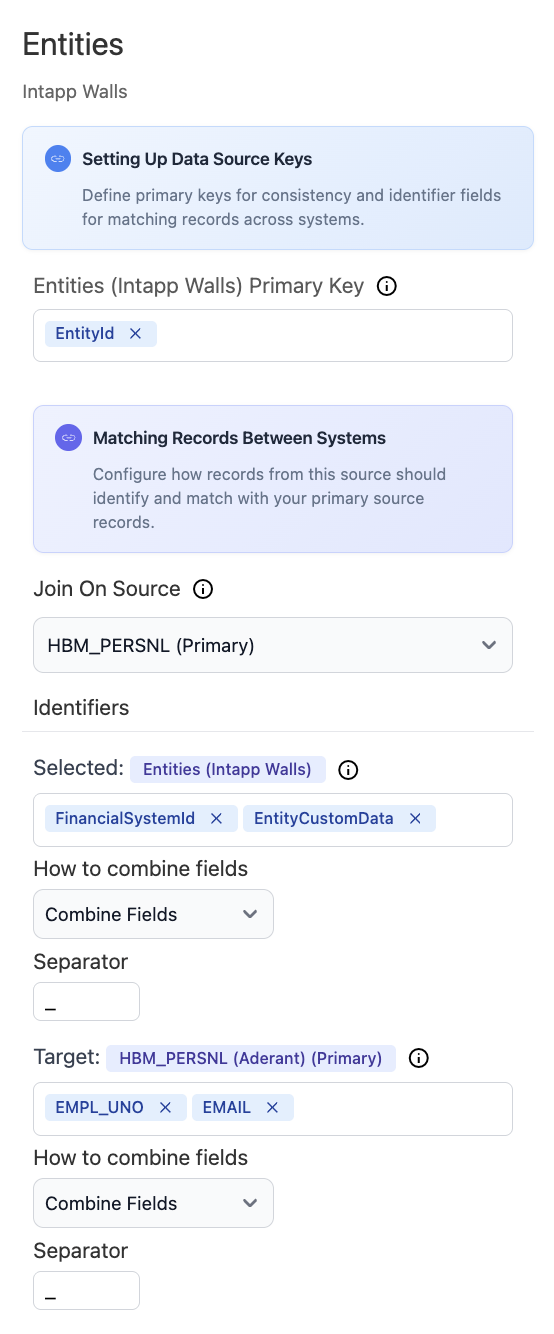
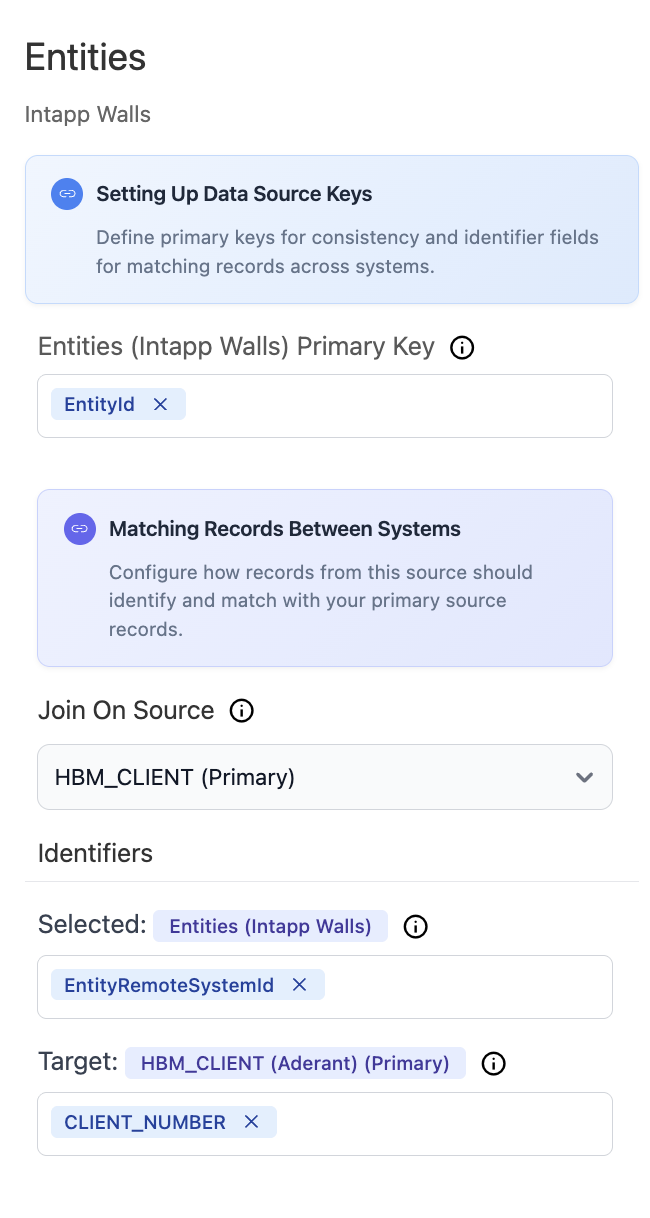
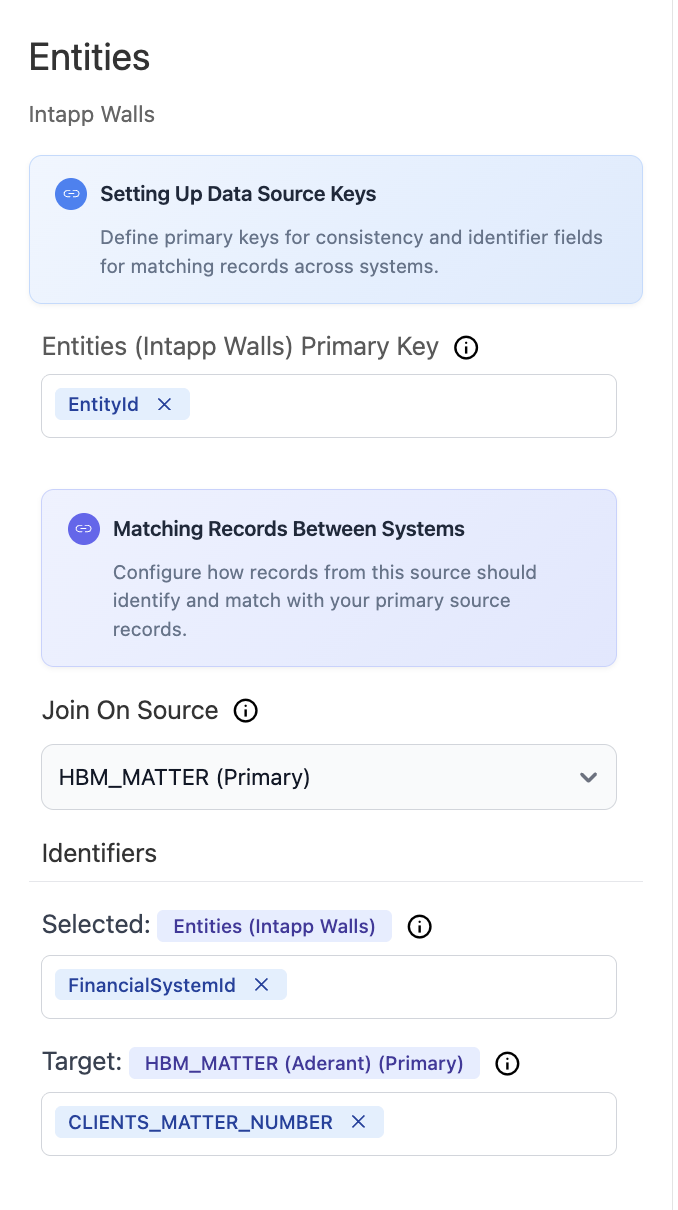
Rule Types
- System Rules & Groups
- Ingested Rules & Groups
Available for: Client, Matter, and Person entitiesOnce prerequisites are met for an entity:
- Create custom access rules directly in Entegrata
- Build groups with static or dynamic membership
- Define granular permissions for your data
- Layer controls on top of any existing permissions
Core Concepts
Permission Model
The Entegrata Access Control system uses a hierarchical permission model:- Default Permissions - Base-level permissions applied to all resources of an entity type
- Rule-Based Permissions - Specific rules that override defaults for targeted subjects and objects
- Permission Precedence - More specific rules take precedence over general ones
Key Terminology
concept
An individual user in the system who can be granted access permissions
concept
An actor or group that permissions are applied to (who has access)
concept
The data entity or specific record being accessed (what is being accessed)
concept
A canonical data type in your Lakehouse (e.g., Client, Matter, Timekeeper)
concept
An access control policy that defines permissions for specific subjects and objects
concept
A collection of actors that can be managed together for access control purposes
How Access Control Works
1
Verify Main Pipeline Exists
Ensure your main production pipeline is deployed and has completed at least one successful run. Access control features are only available after this prerequisite is met.
2
Map Data Sources to Canonical Objects
Complete data mapping configuration for Client, Matter, and Person entities. Deploy these entity mappings and ensure the main pipeline processes them successfully.
3
Review Default Permissions
Check and configure default permissions for each entity. Important: All entities default to Deny (false), so this step is critical to ensure proper base-level access.
4
Enable Access Control Ingestion (Optional)
For Aderant or Intapp Walls data sources, optionally enable access control synchronization to import existing rules and groups from these systems (requires specific entity prerequisites).
5
Create Access Groups
Organize users into groups for efficient permission management, using either static membership or dynamic filters. Requires Person entity to be deployed. For best actor identification, also map Employment with Entra for UPN-to-username mapping.
6
Define Access Rules
Create system rules to implement your access control requirements, layering custom permissions on top of defaults and any ingested rules. Requires Person entity to be deployed and run for subject data.
7
Test Permissions
Use the comprehensive testing tools to verify that permissions work as expected before rolling out to users.
8
Monitor and Adjust
Use exploration features to review access patterns, audit permissions, and refine your configuration over time.
Common Use Cases
Legal Data Security
- Restrict matter access to assigned attorneys and staff
- Implement ethical walls for conflict management
- Control access to sensitive client information
Compliance Requirements
- Enforce data residency and jurisdiction rules
- Maintain audit trails of access permissions
- Implement need-to-know access policies
Organizational Hierarchy
- Grant department-level access to relevant data
- Implement role-based access control (RBAC)
- Manage temporary access for consultants
Best Practices
Next Steps
Enable Access Control
Learn how to enable access control for your data sources
Configure Permissions
Set up default permissions for your entities
Create Your First Rule
Build custom access rules for specific scenarios
Explore the System
Use testing tools to understand permission flows
Need Help?
If you encounter issues or have questions about access control configuration:- Contact Entegrata Support
- Review the troubleshooting guide
- Schedule a consultation with your Customer Success Manager