
User Overview
Understand how user accounts work in Entegrata and how they integrate with Azure Entra ID.Key Concepts
User Record
Each user in Entegrata has the following core attributes:string
required
The display name of the user as it appears throughout the system
string
required
The primary email address used for authentication and login
string
An alternative email address for communications (defaults to account email if not specified)
enum
required
The current state of the user account:
- Active - User can log in and access the system
- Inactive - User account is temporarily disabled
- Pending - User has been invited but not yet activated
- Deleted - User has been soft-deleted and cannot access the system
User Lifecycle
A user typically moves through four stages: Creation → Active Use → Modification → Deactivation or Deletion. Deactivated or deleted users lose access but their data and audit history remain for compliance.Azure Entra ID Integration
Entegrata integrates with Azure Entra ID (formerly Azure Active Directory) for enterprise SSO.Navigation
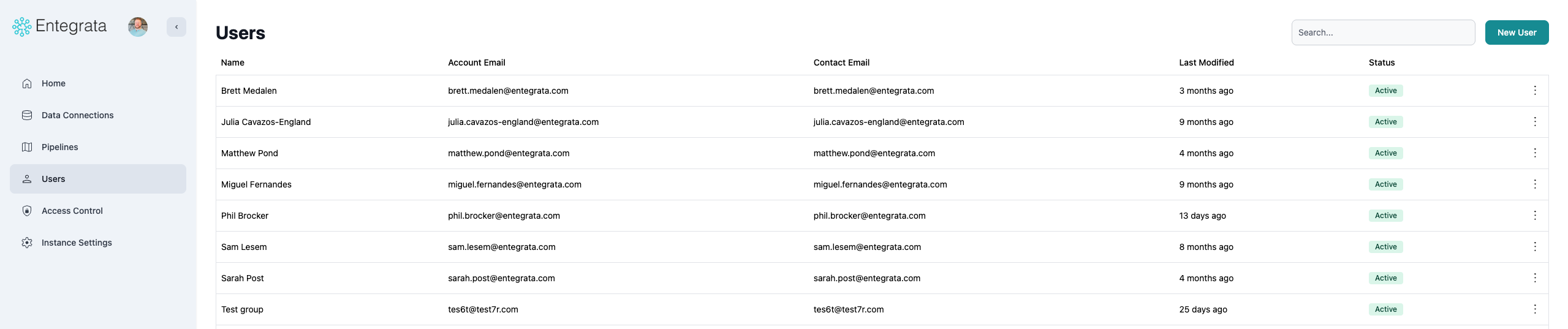
To access User Management:- Log into the Entegrata Admin Portal (https://admin.entegrata.com)
- Select Users from the left sidebar
What’s Next?
User Management
Learn how to view, add, edit, deactivate, and delete users
Troubleshooting
Common issues and solutions for user management